 LayoutKeeper™ for Windows
Why do my windows move to one monitor after sleep or undocking?
Short answer: when a monitor disappears, even for a second, Windows moves its windows to a screen that's still there. When the monitor comes back, Windows often leaves them where they landed. Undocking, a monitor going to sleep, a KVM switch or a dock that wakes up slowly all count as "disappearing".
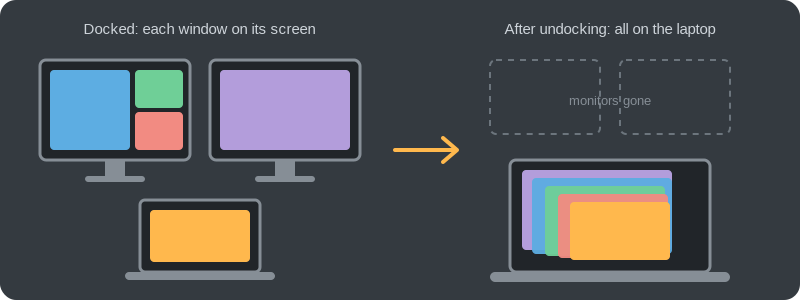
What's happening
Windows has to keep every window on a screen you can see. So the moment a display goes away, it rearranges: windows from the missing monitor move to the main screen, and maximized windows are maximized there instead. When the display returns, Windows 11 tries to put things back, Windows 10 doesn't, and both often get it wrong if the monitors return in a different order or with a different resolution.
Common triggers
- Undocking and docking a laptop, including unplugging a single USB-C or HDMI cable.
- Monitors that sleep: many DisplayPort monitors look unplugged to Windows when they go to sleep. See the DisplayPort fix.
- The PC waking from sleep before the monitors are fully on.
- Remote Desktop sessions, which change the screens Windows sees.
- Driver or Windows updates that briefly reset the display.
What you can do in Windows
- Windows 11: open Settings > System > Display > Multiple displays and make sure Remember window locations based on monitor connection is ticked. It's on by default; see what it does and doesn't do.
- Windows 10: there's no such setting. See your options on Windows 10.
- Stop monitors from disappearing in the first place: turn off "deep sleep" in the monitor's own menu, and keep each cable in the same port every time (a setup that helps).
- Move a stray window back by hand: click it and press Win + Shift + ← or → to send it to the next monitor.
When that isn't enough
Windows' own setting only moves windows that are still open, and only when it recognizes the monitors. It doesn't reopen apps you closed, and it doesn't help after a restart. For that you need a tool that saves where everything was and puts it back when your monitors change.
More guides
- How to make Windows 10 remember window positions on multiple monitors
- Windows 11 "Remember window locations" not working? What it does and doesn't do
- Desktop icons keep moving after you dock or undock? Here's the fix
- Monitor goes to sleep and all your windows move? The DisplayPort fix
- How to reopen your apps and windows where they were after a restart
- Laptop, dock and two monitors: a setup that keeps windows in place
- How to save and restore window layouts on Windows: free and paid options
- PowerToys Workspaces vs. automatic restore: which do you need?
- DisplayFusion alternative: when a simpler tool is enough
- How to open the same apps and documents every time you start Windows