 LayoutKeeper™ for Windows
Laptop, dock and two monitors: a setup that keeps windows in place
Short answer: Windows keeps track of monitors by how they're connected. Plug in the same way every time, stop monitors from sleeping too deeply, and arrange the screens once in Windows. Most window shuffling stops there.
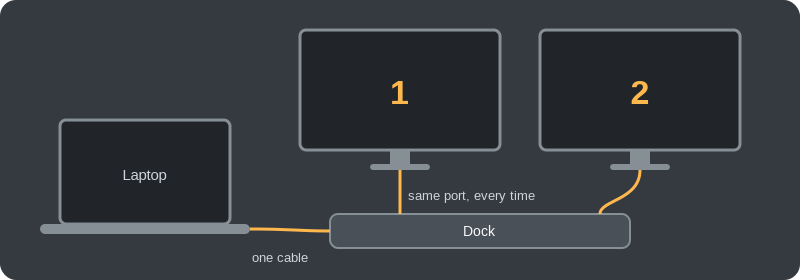
The setup
- Use the same dock port on the laptop every time. Laptops with several USB-C or Thunderbolt ports can treat each one differently.
- Give each monitor its own port on the dock and never swap them. Label the cables if they look alike. Identical monitors are told apart only by the port they're on.
- Arrange the screens once in Windows: Settings > System > Display, drag the boxes to match your desk, and pick your main display. Press Identify to see which is which.
- Turn off the monitors' deep sleep in their own menus (why).
- Keep scaling the same where you can. Mixing 100% and 150% works, but changing it often confuses apps.
- Update the dock's firmware and drivers from its maker's support page.
- Windows 11: keep "Remember window locations based on monitor connection" ticked under Multiple displays (what it does).
Docking and undocking every day
Even a perfect setup moves windows when you undock, because the monitors really are gone. The difference is what happens when you dock again: with a stable setup, a layout tool or Windows 11 can recognize the monitors and put everything back. Without it, you'll be dragging windows around each morning. More in why windows move to one monitor.
More guides
- Why do my windows move to one monitor after sleep or undocking?
- How to make Windows 10 remember window positions on multiple monitors
- Windows 11 "Remember window locations" not working? What it does and doesn't do
- Desktop icons keep moving after you dock or undock? Here's the fix
- Monitor goes to sleep and all your windows move? The DisplayPort fix
- How to reopen your apps and windows where they were after a restart
- How to save and restore window layouts on Windows: free and paid options
- PowerToys Workspaces vs. automatic restore: which do you need?
- DisplayFusion alternative: when a simpler tool is enough
- How to open the same apps and documents every time you start Windows